
Zero-dependency time-series, telemetry, multi-plot grid matrix layouts, and digital signal charting with decoupled 60 FPS interactive hover tracking and vector PDF export.
Motivation: Zero External Dependencies
Visualizing telemetry, IoT metrics, scientific data, and device states in desktop and web applications often comes with external baggage. Many charting tools require third-party plugins, external C/C++ libraries, or restrictive licensing terms.
NativeXYPlot is a 100% native 2D plotting engine and multi-plot grid system built strictly with Xojo core primitives (Graphics, Picture, and PDFDocument). It provides complete control over rendering, smooth canvas interactivity, and clean cross-platform compatibility across macOS, Windows, and Linux.
Core Architecture: Decoupled 2-Layer 60 FPS Rendering
Redrawing complex line charts with thousands of data points on every mouse movement causes canvas stutter. NativeXYPlot solves this with a two-layer decoupled rendering architecture:
flowchart TD
    subgraph Data ["1. Data Sources"]
        D1["Numbers (Double Arrays)"]
        D2["Time-Series (DateTime Arrays)"]
        D3["Digital States (Boolean Arrays)"]
    end

    subgraph StaticLayer ["2. Layer 1: Static Picture Buffer (Compute Once)"]
        S1["NativeXYPlot / NativeXYPlotGrid"]
        S2["Rasterizes background, grid lines, tick labels, thresholds, and curves"]
        S3["Rendered into offscreen Picture bitmap (mBasePicture)"]
    end

    subgraph FastOverlay ["3. Layer 2: Interactive Overlay (60 FPS Vector Pass)"]
        O1["Canvas.MouseMove / MouseDrag / MouseWheel"]
        O2["Paints mBasePicture to Graphics context"]
        O3["Draws vertical crosshair guide, snapped curve badges, & legend card"]
    end

    Data --> StaticLayer
    StaticLayer --> FastOverlay
- Static Picture Buffer (Layer 1): All heavy curve math, axis transformations, grid lines, and labels are rendered once into an offscreen
Picturebitmap viaMakeChartPicture(). - Interactive Overlay (Layer 2): When moving the cursor, panning, or zooming,
DrawTrackingOverlay()orDrawTrackingOverlayByValue()draws only the crosshair guide, snapped curve points, and value badges directly onto the activeGraphicscontext without re-rasterizing background curves.
Key Capabilities
1. Multi-Mode X Scaling & Auto-Scaling
- Time-Series (
DateTime): Automatic Unix epoch conversion with adaptive date formatting (dd/MMordd/MM HH:mmbased on visible span). - Linear Numeric: Dynamic power-of-10 step calculation with clean, rounded grid divisions.
- Auto-Fit (
AutoScale,AutoScaleX,AutoScaleY): Automatically fits scale boundaries to active data with configurable margin padding.
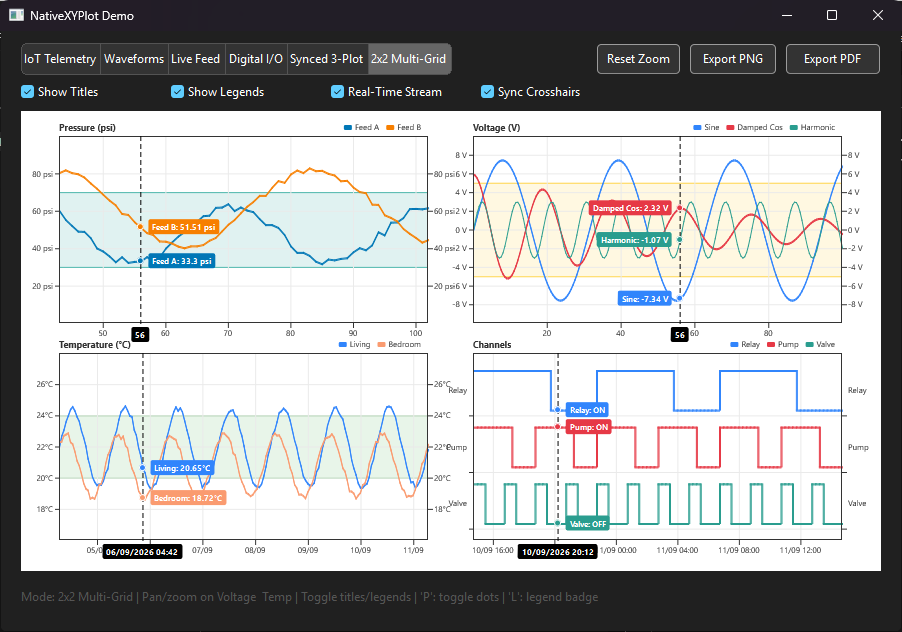
2. Multi-Plot Grid Matrix (NativeXYPlotGrid)
Organize multiple subplots into rows and columns on a single canvas with flexible cell spacing and outer margins:
+---------------------------------------------------+
|  NativeXYPlotGrid (e.g. 2 Rows x 2 Columns)       |
|                                                   |
|  [ Cell (0, 0): Plot A ]   [ Cell (0, 1): Plot B ]|
|  (Live Stream Sensor)      (Harmonic Waveform)    |
|                                                   |
|  [ Cell (1, 0): Plot C ]   [ Cell (1, 1): Plot D ]|
|  (IoT Climate 7-Days)      (Digital I/O Tracks)   |
+---------------------------------------------------+
- Independent Zoom & Pan: Scroll mouse wheel or drag to adjust specific subplots independently.
- Linked Axes (
LinkAllX,LinkColumnX): Synchronize X-axis zooming and scrolling across rows or columns. - Synchronized Scrubbing (
SyncCrosshair): Broadcast hover crosshairs across all subplots simultaneously.
3. Digital Signals & Categorical Step-Lines
Plotting binary state transitions (e.g., Pump ON/OFF, valve actuation) with standard linear curves creates misleading diagonal slopes. NativeXYPlot provides dedicated step-curve renderers (AddStepSeries, AddBooleanSeries, AddDateBooleanSeries) and discrete categorical Y labels:
// Discrete Y-axis (0 = OFF, 1 = ON)
plot.SetYDiscreteLabels(Array("OFF", "ON"), -0.2, 1.2)
plot.SetYTitle("State")

// Add boolean square-wave tracks
plot.AddDateBooleanSeries(timestamps, relay1States, &c3185FC, "Relay 1 (Power)", 2)
plot.AddDateBooleanSeries(timestamps, pumpStates, &cE63946, "Coolant Pump", 2)
4. Tolerance Bands & Event Markers
- Threshold Zones (
AddThreshold): Highlight safe operating bands (e.g., 20°C – 24°C) with background shading and boundary lines. - Event Markers (
AddMarker): Pinpoint specific maintenance timestamps, alerts, or threshold breaches with vertical lines and label badges.
5. Vector PDF & High-Res PNG Export
- Vector PDF (
MakePDFDocument,ExportPDF): Generates scalable vector PDF documents using XojoPDFDocument. - High-Resolution PNG (
MakeChartPicture(w, h)): Exports crisp offscreen raster images at arbitrary pixel dimensions.
Interactive Demo Showcase
The included demo project (demo/Sample.xojo_project) features 6 built-in recipe modes:
| Tab | Demo Mode | Description | Key Features |
|---|---|---|---|
| 0 | IoT Telemetry | Multi-sensor climate monitoring over a 7-day timeline. | Date axis (SetXDateScale), comfort zone shading (AddThreshold), milestone markers (AddMarker). |
| 1 | Waveforms | High-frequency harmonic sine waves & damped cosine decays. | Dual-polarity linear scales (-10V..+10V), math functions, multi-series styling. |
| 2 | Live Feed | Real-time sensor stream updating on a 250ms interval timer. | Dynamic rolling ring buffer (mLiveX, mLiveY), auto-scrolling linear scale. |
| 3 | Digital I/O | Multi-channel actuator & relay timeline with discrete logic states. | Discrete categorical Y labels (SetYDiscreteLabels), stacked boolean digital lanes (AddDateBooleanSeries). |
| 4 | Synced 3-Plot | 3 stacked subplots linked to a unified time axis. | Synchronized scrubbing cursor (DrawTrackingOverlayByValue), linked timeline crosshairs. |
| 5 | 2x2 Multi-Grid | $2 \times 2$ heterogeneous matrix layout with mixed scales. | Matrix container (NativeXYPlotGrid), independent zoom/pan, broadcast crosshair sync. |
Canvas Interactivity & Keyboard Shortcuts
| Key / Input | Action | Description |
|---|---|---|
P |
Toggle Data Point Dots | Toggles point markers on/off. Switches between clean lines and lines with circular dots at each data point. |
L |
Toggle Legend Badge | Shows or hides floating dark legend summary box during hover tracking. |
| Mouse Drag | Pan Viewport | Click and drag horizontally to pan/scroll across the data domain. |
| Mouse Wheel | Zoom In / Out | Scroll mouse wheel to zoom centered at cursor position. |
Code Examples
1. Single Plot Quickstart
// 1. Initialize and layout
Var plot As New NativeXYPlot(Canvas1.Width, Canvas1.Height)
plot.AddTitle("HVAC Temperature Log")
plot.SetPlotArea(60, 45, Canvas1.Width - 120, Canvas1.Height - 80)

// 2. Set scale (epoch seconds)
Var dStart As DateTime = DateTime.Now - New DateInterval(0, 0, 7)
Var dEnd As DateTime = DateTime.Now
plot.SetXDateScale(dStart.SecondsFrom1970, dEnd.SecondsFrom1970)
plot.SetYLinearScale(15.0, 30.0, "°C")

// 3. Add tolerance band & data series
plot.AddThreshold(20.0, 24.0, &cE8F5E9, &c81C784)
plot.AddDateSeries(livingRoomDates, livingRoomTemps, &c3185FC, "Living Room", 2)
plot.AddDateSeries(bedroomDates, bedroomTemps, &cFA9B70, "Bedroom", 2)
plot.AddMarker(maintenanceDate.SecondsFrom1970, "Filter Serviced", &c6A4C93)

// 4. Render to Canvas
Canvas1.Backdrop = plot.MakeChartPicture()
2. Multi-Plot Matrix Setup (NativeXYPlotGrid)
Var grid As New NativeXYPlotGrid(Canvas1.Width, Canvas1.Height, 2, 2)
grid.SetSpacing(45, 30, 38, 38, 25, 30)

// Cell (0, 0): Live Pressure Sensor
Var p00 As NativeXYPlot = grid.Plot(0, 0)
p00.SetXLinearScale(0, 100)
p00.SetYLinearScale(0, 100, " psi")
p00.SetYTitle("Pressure")
p00.AddSeries(xVals, yPress, &c0077B6, "Feed A", 2)

// Cell (0, 1): Voltage Waveform
Var p01 As NativeXYPlot = grid.Plot(0, 1)
p01.SetXLinearScale(0, 100)
p01.SetYLinearScale(-10, 10, " V")
p01.SetYTitle("Voltage")
p01.AddSeries(xVals, yVolt, &c3185FC, "Sine", 2)

// Render:
Canvas1.Backdrop = grid.MakeChartPicture()
3. Wiring 60 FPS Interactivity & Pan/Zoom in Canvas
// Canvas Properties:
// mGrid As NativeXYPlotGrid
// mBasePicture As Picture
// mMouseX As Integer = -1
// mMouseY As Integer = -1
// mStartX As Integer, mStartY As Integer
// mIsDragging As Boolean
// mActiveHitPlot As NativeXYPlot

// In Canvas.MouseMove:
Sub MouseMove(X As Integer, Y As Integer)
  mMouseX = X
  mMouseY = Y
  Self.Refresh
End Sub

// In Canvas.MouseDown:
Function MouseDown(X As Integer, Y As Integer) As Boolean
  mStartX = X
  mStartY = Y
  mIsDragging = True
  mActiveHitPlot = mGrid.GetPlotAt(X, Y)
  Return True
End Function

// In Canvas.MouseDrag:
Sub MouseDrag(X As Integer, Y As Integer)
  If mIsDragging And mActiveHitPlot <> Nil Then
    Var deltaX As Integer = mStartX - X
    Call mGrid.HandleMouseDrag(deltaX, 0, mActiveHitPlot)
    mStartX = X
    mStartY = Y
    mBasePicture = mGrid.MakeChartPicture()
    Self.Refresh
  End If
End Sub

// In Canvas.MouseWheel:
Function MouseWheel(X As Integer, Y As Integer, deltaX As Integer, deltaY As Integer) As Boolean
  If mGrid.HandleMouseWheel(X, Y, deltaX, deltaY, 1.2) Then
    mBasePicture = mGrid.MakeChartPicture()
    Self.Refresh
    Return True
  End If
  Return False
End Function

// In Canvas.Paint:
Sub Paint(g As Graphics, areas() As Rect)
  If mBasePicture <> Nil Then
    g.DrawPicture(mBasePicture, 0, 0)
  End If

  If mGrid <> Nil And mMouseX >= 0 Then
    mGrid.DrawTrackingOverlay(g, mMouseX, mMouseY, True)
  End If
End Sub
4. Real-Time Streaming Ring Buffer (250ms Timer)
Sub SimTimer_Action()
  mStep = mStep + 1
  Var nowSec As Double = DateTime.Now.SecondsFrom1970

  // 1. Append reading to ring buffer
  mBufTime.Add(nowSec)
  mBufPsi.Add(50.0 + Sin(mStep * 0.2) * 15.0 + Rnd * 4.0)
  mBufFlow.Add(120.0 + Cos(mStep * 0.15) * 20.0)

  // 2. Retain rolling window (e.g. last 60 points)
  If mBufTime.Count > 60 Then
    mBufTime.RemoveAt(0)
    mBufPsi.RemoveAt(0)
    mBufFlow.RemoveAt(0)
  End If

  // 3. Update plot
  Var pLive As NativeXYPlot = mGrid.Plot(0, 0)
  pLive.ClearSeries()
  pLive.AddDateSeries(mBufTime, mBufPsi, &c0077B6, "Pressure", 2)
  pLive.AddDateSeries(mBufTime, mBufFlow, &cF77F00, "Flow", 2)
  pLive.SetXDateScale(mBufTime(0), mBufTime(mBufTime.LastIndex))

  // 4. Redraw
  mBasePicture = mGrid.MakeChartPicture(Canvas1.Width, Canvas1.Height)
  Canvas1.Refresh
End Sub
5. Exporting Vector PDF
Var f As FolderItem = FolderItem.ShowSaveFileDialog(".pdf", "TelemetryReport.pdf")
If f <> Nil Then
  grid.ExportPDF(f, fitPage = True, landscape = True)
End If
Repository Structure
├── .gitattributes                # LF normalization
├── .gitignore                   # Build & debug artifact ignore rules
├── README.md                    # Project overview & quickstart
├── docs/
│   ├── DOCUMENTATION.md         # Full API & architecture reference
│   └── Screenshot.png           # Showcase screenshot
├── src/
│   ├── NativeXYPlot.xojo_code     # Core single-plot engine class
│   └── NativeXYPlotGrid.xojo_code # Multi-plot matrix container class
└── demo/
    ├── Sample.xojo_project      # Showcase desktop demo project
    ├── NativeXYPlot.xojo_code
    ├── NativeXYPlotGrid.xojo_code
    └── Window1.xojo_window      # Demo UI with segmented tabs & 2x2 grid
Summary
NativeXYPlot provides a pure native Xojo charting and matrix layout solution with zero third-party dependencies:
- Drop
src/NativeXYPlot.xojo_codeandsrc/NativeXYPlotGrid.xojo_codeinto desktop or web projects. - Explore
demo/Sample.xojo_projectto test the 6 interactive demo modes. - Refer to docs/DOCUMENTATION.md for full API reference.